When it comes to managing fuel expenses, CFN card controls give fleet managers complete control over their company's fuel purchases. With customizable settings for transaction limits, fuel types, fueling times, and locations, you decide exactly how and when your drivers can make purchases. These tools help prevent unauthorized spending, reduce fuel theft, and ensure every dollar is spent where it should be, on your business.
In this guide, we’ll walk through every CFN control available, how each one works, and best practices for setting them up. You’ll also learn how to monitor transactions in your online portal, set up exception alerts, and use real-time data to keep your fleet’s fuel program secure and running smoothly. Whether you’re managing a small business fleet or hundreds of vehicles, CFN fuel card controls help you take complete control of your company’s fuel costs.
Table of Contents
- CFN fuel card controls: overview
- A deep dive into CFN card controls
- Monitor your CFN fuel card usage
- How to get started with CFN card controls
CFN Fuel Card Controls: Overview
Here's a quick overview of the card controls and account alerts the CFN fuel card offers:
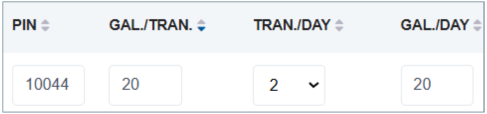
- Pin/Driver ID: Custom 5 digit number assigned to a card or driver. A valid PIN or ID must be entered to enable fueling.
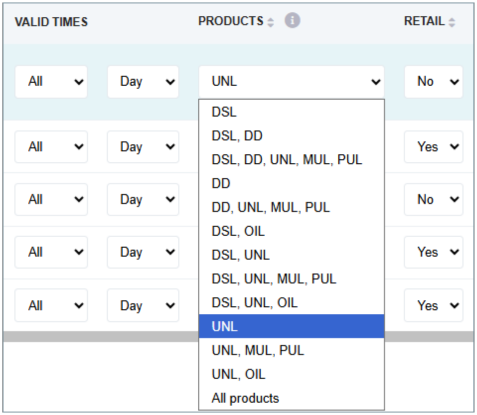
- Product controls: The type(s) of fuel a driver can purchase.
- Transactions per day: Number of fuel transactions permitted on each card per day.
- Gallons per transaction: Gallon amount a driver can purchase per transaction.
- Gallons per day: The number of gallons a driver can purchase in a day.
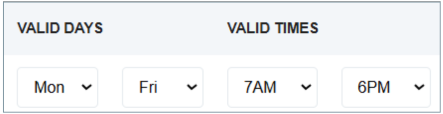
- Day of week: Days when a card can be used.
- Time of day: Hours when a card can be used.
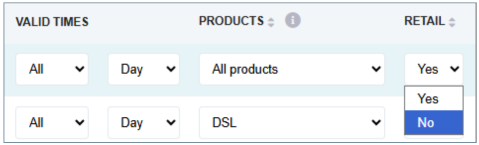
- Retail site lockout: Lockout retail stations by state so drivers can only use CFN locations.
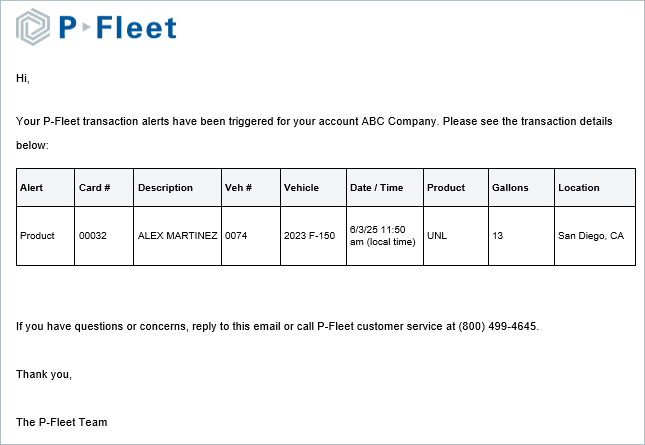
- Exception alerts: Email alerts generated when a card is used outside your designated parameters.
- E-Receipts: Email alerts generated when a card is used.
- Fraud alerts: Email alerts generated if suspicious activity occurs on your account.
A Deep Dive into CFN Card Controls
CFN card controls help fleet managers prevent unauthorized use by drivers, but it can be difficult to determine which ones to use. We’ve summarized the best practices of each CFN control below so you can make the right decisions for your fleet. To ensure your team understands these restrictions, we recommend outlining them in your driver fueling policy as well.
PIN/Driver IDs
Being able to set up individual PIN numbers for each driver is one of the biggest benefits of these cards, and every company should be utilizing this technology. When you set up your program, each driver will be able to select a 5-digit PIN number that is unique to them. Drivers should not use their birthdays or any other easily-identifiable numbers to prevent others from guessing their PIN.
You’ll also decide whether to issue driver cards or vehicle cards:
- Driver cards: are assigned to a driver, and that driver must enter their PIN for every transaction.
- Vehicle cards: are assigned to specific vehicles, but activated by individual Driver IDs. Each driver has their own unique ID that works with any vehicle card, so no matter which vehicle they’re using, you’ll always know who made the purchase. This setup provides visibility and accountability for fleets where drivers switch vehicles often.
Product Controls

Cardlock fuel cards, such as the CFN fuel card, are the only cards that offer product controls because only cardlock stations have the technology to enforce them. Retail gas stations and truck stops can’t restrict fuel types at the pump, so drivers can buy any fuel product there.
When you set product controls on a CFN card, the system automatically declines transactions for any fuel type outside the one you’ve approved. For example, if your vehicles run on diesel, setting a “diesel-only” restriction prevents drivers from buying unleaded fuel for their personal vehicles.
Since retail sites can’t enforce product controls, CFN gives you options to maintain oversight when drivers fuel at FleetWide retail sites. You can enable product exception alerts to receive an email anytime a driver buys the wrong fuel type, or you can lock out retail stations entirely, requiring drivers to fuel only at cardlock sites where product limits are enforced.
Transactions Per Day

Setting transactions per day limits is a simple and effective way to prevent misuse, but it’s important to leave a little flexibility. Sometimes a pump might malfunction, or a driver could enter the wrong PIN, and both situations count toward the daily transaction limit, potentially locking the card before they’ve even fueled up. To prevent those mid route headaches, it’s best to allow one extra transaction per day beyond what’s typically needed. This gives drivers a little buffer while keeping strong controls in place.
Gallons Per Transaction
Most fuel cards set limits by dollar amount, but CFN takes a better approach by using gallon limits instead. Because fuel prices fluctuate, dollar based limits can quickly become inaccurate, either preventing drivers from filling the tank completely or setting limits too high, which increases risk. By limiting transactions by gallons, you create a consistent, precise control that matches your vehicle’s fuel tank capacity, no matter how prices change at the pump.
Gallons Per Day
You can also set a daily gallon limit to control how much fuel a driver can purchase each day. If drivers typically fuel up once per day, match the daily limit to your gallons per transaction setting, but allow for one extra transaction in case of a wrong PIN or pump error. This gives drivers a second attempt if something goes wrong, without giving them access to extra fuel.
Day of Week

For fleets with consistent schedules, day of week controls are one of the easiest ways to tighten security. You can block weekend transactions, set specific fueling days, and keep purchases aligned with your operating hours. Before turning this control on, make sure there aren’t any valid reasons for drivers to fuel outside those times. For instance, if your team usually works Monday through Friday, but occasionally runs weekend routes, you can leave those days open and simply set alerts for weekend fueling instead. But if exceptions are rare, restricting fuel access by day is a quick, effective way to protect your account and prevent unauthorized spending.
Time of Day
For companies that operate on set schedules, it may be helpful to eliminate fueling after hours. Limiting by time of day makes it easy to restrict all purchases to working hours. If there are special situations that you must leave the card open for, then create alerts for those times. For example, your drivers typically work 7am to 4pm, but occasionally someone may need to work late. You could set the time of day allowed to 7am to 4pm and an alert for any fueling between 4pm and 7am.
Retail Site Lockout

You can choose to fuel exclusively at CFN cardlock sites or expand access to include 65,000 retail gas stations and truck stops. One of the biggest advantages of the CFN network is the cost-plus pricing available at CFN locations, which can save your business significantly over time. If your routes stay within regions with plenty of CFN sites, it’s best to lock out retail locations to ensure you always get cost-plus CFN fuel pricing. But if your drivers travel through areas with limited CFN coverage, keeping retail access turned on gives them the flexibility to fuel wherever they need to, without disrupting operations.
Monitor Your CFN Fuel Card Usage
Online Account Access
Fleet managers should regularly log into their online fuel card portal to stay on top of spending and driver activity. From the dashboard, you can review recent transactions, track fuel usage by driver or vehicle, and run detailed reports to spot trends or irregularities. This visibility helps ensure drivers follow your company’s fueling policy and allows you to catch potential misuse early, before small issues become costly problems.
Emailed invoices
If you use invoices to monitor your activity, opt to receive invoices by email so you can review as soon as possible. Keep in mind, most vendors have a time limit to report any fraudulent charges, so ensure that you’re checking your invoices consistently.
Exception Alerts
If you feel that certain purchase controls might disrupt your operations, you can opt to create alerts instead. Alerts can be created for the controls listed above, but they will still allow the transaction to process. If a transaction occurs outside of your normal parameters, you will then receive an email alert with the details of the purchase, allowing you to follow up with the driver to ensure the purchase was legitimate and remind them to comply with your fueling policy.

E-Receipts
If you manage a small to mid-sized fleet, you may want instant notifications for all transactions. Though this allows for the utmost control of your fleet, it may be overwhelming for larger fleets with dozens of vehicles.
How to Get Started with CFN Card Controls
Setting up your CFN fuel card controls is all about finding the right balance between security and efficiency. You want to prevent unauthorized purchases without slowing down your drivers or operations. The good news is, you can adjust settings anytime as your needs change.
Here’s how to start managing your company’s fuel purchases effectively with CFN card controls:
1. Set Realistic Limits Based on Vehicle Tank Size
Start by using each vehicle’s tank size to determine the gallon limit per transaction you should set.
If you’re unsure of a vehicle’s tank size, check the owner’s manual or look it up online.
2. Match Fueling Hours to Driver Schedules
If your team runs consistent routes or shifts, set fueling days and hours to align with their work schedule. You can add a small buffer, an hour before or after their schedule to allow for early starts or traffic delays. Limiting card activity to active work hours reduces the chance of unauthorized purchases outside normal operations.
3. Review Activity and Adjust as Needed
During the first week of using new controls, you’ll quickly see if your limits are too tight or too flexible. Encourage drivers to report any issues right away, then log into your CFN online account to make adjustments. Over time, you’ll refine your controls to strike the perfect balance.
Start Controlling Fuel Expenses with the P-Fleet CFN Fuel Card
With P-Fleet’s CFN fuel card, you get more than just nationwide fueling access, you get complete control over how, when, and where your drivers purchase fuel. Every setting, from gallon limits to fueling times, is designed to help your business prevent fuel theft and fraud.
Through P-Fleet’s online account portal, you can view transactions, track fuel usage by driver or vehicle, and adjust controls anytime as your needs change. Whether you want to lock out retail sites, set fuel type restrictions, or create custom alerts for unusual activity, you have the flexibility to adjust your program to your fleet’s unique operations.